I finally got my hands on the micro:bit, the BBC’s new educational computer and spiritual successor to the legendary BBC Micro, and I’m absolutely in love with its potential as a platform for learning how to code.
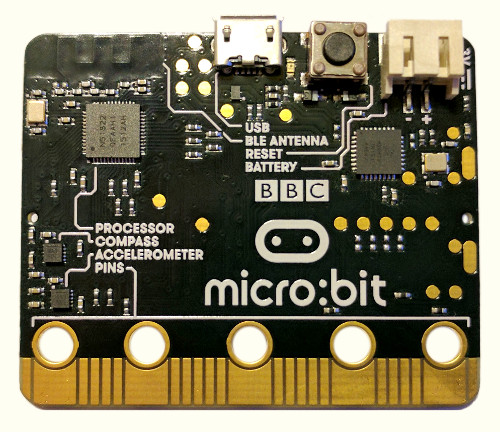
A lean (but not mean) learning machine. I like how the parts are all clearly labeled, as if to say: “There is no magic here. Everything that makes this board work can be understood.”
The platform
Microcontroller-based devices like the micro:bit offer some advantages over PCs as a tool for learning about programming. They can be connected directly to a variety of interesting peripherals to motivate experimentation. More importantly, they provide what is, in contrast, a radically simple programming environment: there are no operating systems, threads, processes, filesystems, or virtual memory to hinder a true understanding of what it means, in the most basic sense, for your program to run on a computer. When coding a microcontroller it is (to a certain extent) just you and the CPU.
On the other hand, it can take some effort to get up and running with most microcontrollers’ development environments. Even beginner-friendly kits like the Arduino will require special software and drivers to compile and load your firmware, which can make them a non-starter for some classrooms or casual beginners. And once all that’s set up, you’re likely going to be programming the thing in a dialect of C—not the most approachable choice for a new programmer.
So I’m delighted that the micro:bit delivers all the advantages of a microcontroller while providing an extraordinarily easy to use development system.
First, the platform: at the micro:bit’s heart is an ARM Cortex-M0 microcontroller running at 16 MHz, with 256 kB of flash and 16 kB of RAM. Its peripherals include a 5x5 array of LEDs with PWM, two buttons, a compass, an accelerometer, and a BLE radio; additional peripherals can be attached using a number of pins including I2C, SPI, and digital and analog I/O.
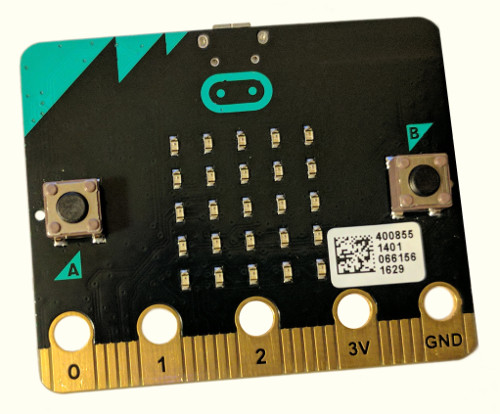
The micro:bit’s low-resolution yet highly programmable user interface.
I initially thought the micro:bit’s LEDs and buttons a laughably limiting provision for I/O, but after having programmed it I now think it’s a great idea. It provides just enough pixels to display scrolling text and basic graphics, while remaining simple enough that learners won’t be overwhelmed by a need to employ abstractions like sprites in order to create simple visuals.
The development environment
As for the development environment, there’s no software to install, which means the micro:bit should be readily usable by schools whose students use Chromebooks (or locked-down Windows machines or Macs). The only prerequisite is a web browser, which allows you to use one of multiple web-based code editors at microbit.org. And once you’ve written your program, there are no special drivers required to flash it onto the board; the micro:bit presents itself as a USB mass storage device, to which you need only download a hex file compiled by the editor in order to run your program.
Hobbyists will likely be drawn to the micro:bit’s MicroPython port (python.microbit.org). This includes a set of well-documented Python libraries to take advantage of the board’s peripherals, including external servos or neopixel LED strips. Advanced users can even access a Python REPL over the board’s USB serial interface.
As an engineer, I’m thoroughly impressed with the achievement of porting Python to the micro:bit. MicroPython generally targets the Cortex-M4, but here they got it running on an M0 with just 16 kB of RAM and no hardware floating-point support.
And it allows you to write succinct little programs like this one, which plays a tone on an attached piezo buzzer with a pitch depending on the angle at which the device is held:
from microbit import *
import music

def position():
    y = accelerometer.get_y()
    pos = (y + 1000) / 2000
    pos = min(pos, 1.0)
    pos = max(pos, 0.0)
    return pos

def tone_hz(pos):
    return int(80 * 55**pos)

while True:
    if button_a.is_pressed():
        music.pitch(tone_hz(position()), 10)
But for fledgling programmers I think Microsoft’s Programming Experience Toolkit (pxt.microbit.org) is the star of the show. It features mostly the same library features as the Python implementation, but it gives the user both Scratch-style block programming and event-driven JavaScript code—and it can translate your programs between one representation and the other, providing a nice set of quick-release training wheels for beginners. PXT also shows the output of your program as you type, in an emulated micro:bit displayed alongside the editor.
Some minor trouble
Unfortunately, my experience with the micro:bit has not been entirely trouble-free. The first unit I ordered developed a problem where the USB interface chip would overheat while connected to my computer, which has also been reported by other users. After this happened, I could no longer operate the micro:bit using its battery pack, and it would intermittently reset while powered by USB. I got a replacement unit which has yet to develop similar problems, but this experience doesn’t bode well for the robustness of a device that is meant to survive in the hands of 11 to 12-year-old students.
Update: jaustin from the micro:bit Foundation commented on Hacker News,
I work for the micro:bit Foundation, who have taken ownership of the project on from the BBC […] as the author hoped, the revision of the hardware now shipping is more resilient to ESD than the previous one :)
I also have some concerns about the placement of the external pins. Given that micro:bit kits like those sold by Tech Will Save Us use alligator clips to connect to the board’s pins, it seems way too easy to short out one of these pins with its neighbors.
Finally, the micro:bit’s 16 kB of RAM is quite limiting, at least when using the MicroPython runtime. While writing a moderate-size program I managed to repeatedly exhaust the SoC’s memory, resulting in difficult to debug MemoryExceptions. I can easily imagine intermediate users running up against and being confused by this limitation, and would welcome a version of the micro:bit with double the RAM. But to be fair, I have not yet tried writing a program of similar size with PXT, which may have less overhead or may handle memory exhaustion with clearer error messages.
The verdict
The above pain points aside, I’m extremely optimistic about the micro:bit’s potential for introducing a new generation of students to programming. I imagine that the overheating USB chip issue will be resolved, perhaps by a new board revision, and I’m looking forward to this board being generally available for distribution to schools in the USA and elsewhere.
