Update: Jacob Stanley has a great article on installing gtk2hs on Windows which goes into more detail, including a tutorial on GTK theming.
Gtk2hs is my favorite way to do cross-platform GUI programming in Haskell — and it’s the toolkit to use if you want to work through the examples in the excellent *Real World Haskell*. But the official instructions for building gtk2hs on Windows leave out some important information, so here’s how I got it all working on Windows 7…
Haskell Platform
First of all, if you haven’t done so already, download and install the latest release of the Haskell Platform for Windows (version 2010.2.0.0 at the time of this writing). Opt for the installer to add GHC and friends to your %PATH%.
GTK+
Next download the GTK+ 2.16 all-in-one bundle and extract it to C:\Gtk, then add C:\Gtk\bin to %PATH% by hand. (Alas, I was unable to get gtk2hs 0.11 to build with GTK+ 2.22 — it failed complaining that c:/devel/dist/win32/libpng-1.4.3-1/lib doesn’t exist, and I didn’t feel like messing with it beyond that point.) If you have Cygwin stuff on your Windows path, make sure the Gtk directory has higher priority; you can use PowerShell’s Get-Command to check on this, e.g. run get-command pkg-config and make sure the one in C:\Gtk\bin is listed first.
Verify that the library is installed correctly by running:
pkg-config.exe --modversion gtk+-2.0
The above will report the version number of your installed GTK+ library, e.g. 2.16.6. If you get an error message here then something is wrong…
MinGW
The gtk2hs documentation claims you don’t need MinGW installed to build on Windows, but this isn’t strictly true from our perspective: you’ll need MinGW’s gpp in order to build Haskell’s Cairo bindings, upon which the GTK module depends.
The good news is that all the MinGW components you need are already included with the Haskell Platform distribution, so just add its mingw\bin subdirectory to your path. Make sure that this, too, has a higher priority than any Cygwin (or SUA, for that matter) entries in the Windows environment variables; the Cabal installs we’ll be doing in a moment will attempt to invoke the strip command at the end of the build process, and things will go south if Cabal accidentally invokes Cygwin’s strip instead. (This had me scratching my head for longer than I care to admit…)
gtk2hs
Now you should have everything you need to install gtk2hs from Hackage:
cabal update
cabal install gtk2hs-buildtools
cabal install gtk
Hello, world!
You’re all set, assuming Cabal didn’t encounter any problems. Test it out by creating a file Hello.hs with the following:
Build it with GHC:
ghc.exe --make Hello.hs -o Hello
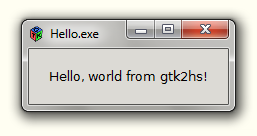
And then run Hello.exe. You should see something like this:
Happy hackage!