Articles tagged: code

My package management cheatsheet

Lately I’ve been hopping between projects that use different Rust, Python, and TypeScript package managers, and I kept having to turn back to documentation to keep their subcommands straight when switching from one back to another. So I made this cheat sheet for my own reference, and I might as well share it with the class too…

Project dependencies

Common package management tasks include:

  • Prepare clone, or ensure the dependencies needed to work with the project are installed, such as after newly cloning the project’s sources.
  • Audit checks the current dependency versions against a public database for known security vulnerabilities.
  • Any outdated checks whether any dependencies have newer versions currently available, among either direct or indirect dependencies.
  • Compatible outdated checks specifically for newer available versions that are compatible with the project’s dependency specification.
  • Add adds a new regular dependency to the project, and add dev adds a new development-only dependency. This step includes locking the dependency.
  • Update brings an application’s locked packages up-to-date with the latest compatible version.

In the package managers I’ve been using lately, these look like:

  cargo uv pip-tools [1] pnpm
Prepare clone N/A uv sync (optional) pip-sync dev-requirements.txt pnpm install
Audit cargo audit [2] uv run pip-audit pip-audit pnpm audit
Any outdated cargo outdated [3] uv tree --outdated pip list --outdated [4] pnpm outdated
Compatible outdated cargo update -n uv lock -Un pip-compile -Un pnpm outdated --compatible
What requires cargo tree --invert uv tree --invert --package pipdeptree -r -p pnpm why
Add cargo add uv add Manually add to pyproject.toml, then run pip-compile pnpm add
Add dev cargo add --dev uv add --dev Add and run pip-compile pnpm add --save-dev
Update cargo update uv lock -U pip-compile -U pnpm update

Read more…

Juggling multiple SSH_AUTH_SOCKs in tmux

This post is about a portable Unix shell script, socklink.sh, written to keep SSH_AUTH_SOCK working within a long-running tmux session—even when switching between multiple clients that have different SSH agents, whether those clients are simultaneously connected or attaching and detaching over time. I also digresses into what I’ve learned from writing and testing a cross-platform shell script in 2025.

Target audience

If you’re reading this I’ll assume you have some knowledge of Secure Shell agent forwarding and how the SSH_AUTH_SOCK environment variable works. I also expect you already have SSH clients configured to use agent forwarding.

The problem

I use tmux almost everywhere I SSH to. I’m also a fan of hardware tokens with proof-of-presence for SSH authentication. [1]

But out of the box, this combination introduces major usability problems when I connect to my dev server from multiple clients. SSH agent requests need to be directed to whichever client I’m currently using so that I can provide proof-of-presence, like by touching the contacts on a YubiKey or using Face ID in Termius. However, in practice the request will go to whichever agent was defined when tmux started. Even if that one is no longer connected!

Diagram of a dev server use case

Different workarounds for scenario this have emerged. A previous employer had a wrapper script called tmx that would fix up SSH_AUTH_SOCK when re-attaching a session from a new client. Meanwhile, this popular gist uses ~/.ssh/rc to override SSH_AUTH_SOCK to the path of a symlink that can be updated as new clients connect. Other solutions involve configuring tmux’s update-environment to reconfigure the session-wide environment when new clients join.

Read more…

In love with the BBC micro:bit

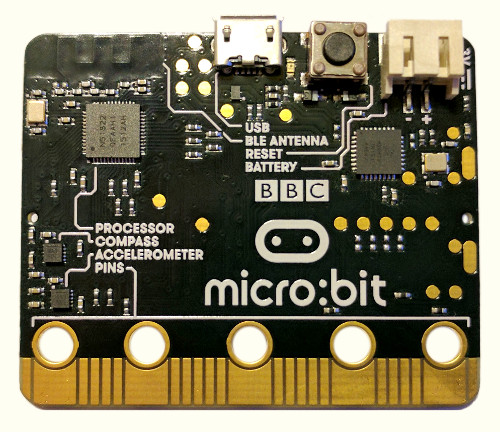
I finally got my hands on the micro:bit, the BBC’s new educational computer and spiritual successor to the legendary BBC Micro, and I’m absolutely in love with its potential as a platform for learning how to code.

The bottom side of the micro:bit, showing chip layout, pins, port, and reset button.

A lean (but not mean) learning machine. I like how the parts are all clearly labeled, as if to say: “There is no magic here. Everything that makes this board work can be understood.”

The platform

Microcontroller-based devices like the micro:bit offer some advantages over PCs as a tool for learning about programming. They can be connected directly to a variety of interesting peripherals to motivate experimentation. More importantly, they provide what is, in contrast, a radically simple programming environment: there are no operating systems, threads, processes, filesystems, or virtual memory to hinder a true understanding of what it means, in the most basic sense, for your program to run on a computer. When coding a microcontroller it is (to a certain extent) just you and the CPU.

On the other hand, it can take some effort to get up and running with most microcontrollers’ development environments. Even beginner-friendly kits like the Arduino will require special software and drivers to compile and load your firmware, which can make them a non-starter for some classrooms or casual beginners. And once all that’s set up, you’re likely going to be programming the thing in a dialect of C—not the most approachable choice for a new programmer.

So I’m delighted that the micro:bit delivers all the advantages of a microcontroller while providing an extraordinarily easy to use development system.

Read more…

Keyboard navigation in Emacs GDB mode

I love Emacs GDB mode, but I always found it annoying that there is no given key binding (or function which could be directly mapped into a key binding) for switching between the different views given by gdb-many-windows. The usual window and buffer switching functions are insufficient because the GDB windows are flagged as dedicated (so switch-buffer refuses to swap them in place), and in the case of the Locals/Registers and Breakpoints/Threads windows, the buffer you want to visit doesn’t necessarily even exist until you click that button.

This went from mildly annoying to a major headache when I needed to run the debugger in a remote Emacs session, over SSH from Mac OS X’s Terminal.app which does not support xterm mouse emulation. So I wrote this gdb-select-window function and corresponding key bindings to finally get the desired behavior…

;; For the consistency of gdb-select-window's calling convention...
(defun gdb-comint-buffer-name ()
  (buffer-name gud-comint-buffer))
(defun gdb-source-buffer-name ()
  (buffer-name (window-buffer gdb-source-window)))

(defun gdb-select-window (header)
  "Switch directly to the specified GDB window.
Moves the cursor to the requested window, switching between
`gdb-many-windows' \"tabs\" if necessary in order to get there.

Recognized window header names are: 'comint, 'locals, 'registers,
'stack, 'breakpoints, 'threads …

Read more…

Both true and false: a Zen moment with C

Additional discussion: Hacker News, Reddit

I ran into a really fun bug at work yesterday, where I discovered that my C program was branching down logically inconsistent code paths. After drinking another cup of coffee and firing up GDB I realized that somehow, a boolean variable in my code was simultaneously testing as both true and not true.

While I cannot reproduce the actual source code here, the effect was that code like

bool p;

/* ... */

if ( p )
    puts("p is true");

if ( ! p )
    puts("p is false");

would produce the output:

p is true
p is false

So what’s going on here?

Read more…

Pointfree style in Python

Additional discussion: Hacker News

I’ve been getting back into Python lately… I just wrote a small module that provides support for pointfree style programming with a combination of automatic partial function/method application and operator overloading for function composition:

from pointfree import *
from operator import add

fn = pfmap(len) \
  >> pfmap(lambda n: n**2) \
  >> pfreduce(add, initial=0)

fn(["foo", "barr", "bazzz"]) # == 50

See the overview for a lengthier introduction. You can install the pointfree module from the Python Package Index:

$ pip install pointfree

Links:

Pagination