Articles tagged: web

Pelican

I finally got around to modernizing this old site, which has included moving from WordPress to a statically-generated, Amazon-hosted site based on Pelican and Bootstrap 3.

I’ll write more about the site’s implementation later because I ended up diving into different areas I think are worth documenting, such as extending Pelican via plugins and some specific issues with hosting a static site on top of Amazon AWS. For now, suffice it to say that if you find any files missing please let me know, as this is probably something I’ve simply forgotten to copy over to the new site.

(Support for IE 8 and older is right out, on the other hand; use IE 10 or better to preserve your sanity.)
Advanced Kindle store search

I just found a great web site providing a better Kindle content search than what’s baked into Amazon: eReaderIQ.com. You can search by price, publication date, reading level, and whether the book you want is in the public domain, among other things.

For example, this query lists only free Kindle books in the public domain. Very handy.

Importing Movable Type Markdown into WordPress

Once again I’ve up and moved my whole little site here to a new platform — Wordpress 3, this time around, on top of Nginx + PHP-FPM + (obviously) MySQL on FreeBSD 8.1. I think I’m making a tradition of tearing down the site and rebuilding it from scratch once every, what, two years? Or maybe I’ll actually manage to keep it fresh this time around…

Heh.

Anyway, I could ramble on forever about why I ditched Movable Type and went with friggin’ WordPress. (What kind of wannabe hipster web developer doesn’t roll his or her own Django / Rails / whatever blogging software? And PHP?! Son, I am disappoint.) But that’s not what this post is about. This post is about a minor detail of how I exported the old site from MT.

You see, Movable Type supports text entry in Markdown format. And it’s cool and groovy and way better than typing out HTML by hand, but the problem is that when you ask MT to export your site, it exports your Markdown posts as unprocessed Markdown, not as HTML. So when you then attempt to import this into a program that doesn’t understand …

Read more…

Firefox 3.5 on Debian Lenny AMD64

Now that Firefox 3.5 is out, I wanted to get it running on my 64-bit Debian 5.0 laptop—but there’s no 3.5 package in Sid yet, as of July 2, and mozilla.com only carries 32-bit binary tarballs for Linux. So I had to build Firefox 3.5 from source. Fortunately this turned out to be a lot less painful than I had imagined; this post will show you how I did it, in case you’re in a similar spot.

Build dependencies

The first thing to do is to make sure you’ve installed everything for the build process. Since you’re on a nice, civilized operating system like Debian, the following commands should have you covered:

$ sudo apt-get install build-essential libidl-dev autoconf2.13
$ sudo apt-get build-dep iceweasel

Obtaining the Mozilla source code

Mozilla’s official developer guide recommends downloading individual source archives for those who simply want to build a Firefox release, but I decided to get the source via Mercurial checkout, since this way there will be less to download and re-compile each time a security update comes along. The downside to this is that the initial download takes longer, and the full …

Read more…

Chrome

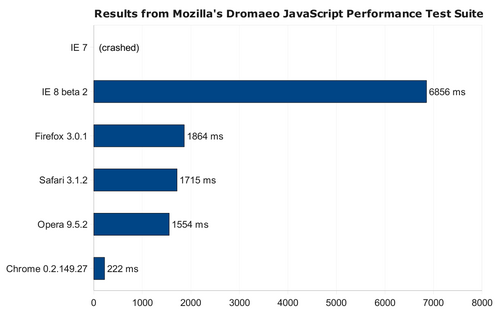
This evening I had the chance to download Google’s newly-released (and by “released” I mean “beta”… hey, it’s Google) web browser, Chrome, and give it a try. They weren’t kidding when they said V8, the new JavaScript virtual machine in Chrome, should raise the bar for next-generation JavaScript implementations: it’s fast. How fast?

dramaeo.png

The above results are from Mozilla’s Dromaeo JavaScript performance test suite, so there’s little worry of this test being intentionally biased in Chrome’s favor. The scores above are the averages of five test executions on each web browser, running in the same Windows XP virtual machine on the same computer. Some notes:

  • Each run of the test was performed in a fresh browser instance.
  • IE 7 was unable to complete the test suite without crashing, although I am using a special, standalone version of IE 7 so this may be particular to my installation.
  • In order to prevent IE 8 from complaining about the long JavaScript execution time, I set set the registry value MaxScriptStatements = (DWORD) 0xffffffff in the key \HKEY_CURRENT_USER\Software\Microsoft\Internet Explorer\Styles.

So yes, Chrome does in fact have a much faster JavaScript engine than any …

Read more…

Opera 9.50

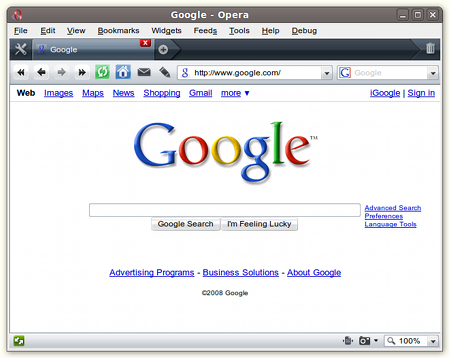
I finally got around to trying the Linux version of Opera 9.50, the newest version of the Opera web browser. Here’s what I think of it after a couple weeks of using Opera 9.50 as my main web browser, particularly how it compares to Firefox 3.0.

opera.png

Things I like in the latest Opera:

  • Tab management, particularly the “Create Follower Tab” feature: You can make a new tab in which any links from the current tab will be automatically opened. This can be great for reading the news.
  • Site preferences: Manage cookie, JavaScript, and other preferences on a site-by-site basis from a single location.
  • The new rendering engine has better CSS compliance than Firefox, and it seems to handle poorly-designed sites with much greater grace than in previous versions of Opera.
  • Plugins such as Adobe Flash appear to be handled using a child process and IPC, making the browser resilient against Flash crashes. This can be done with Firefox too, but it requires the separate nspluginwrapper program, which isn’t installed by default on 32-bit versions of Ubuntu.

Things that I still prefer about Firefox 3.0:

  • I initially loathed it, but the Awesome Bar has really …

Read more…

Pagination